Jobs: what your workspace calls its work
Where the words for your work come from, why Matter and Case can both appear, and how an owner or admin changes them for one business.
On this page
Your workspace may use a different word for its work; the screens are the same.
This help center calls one piece of your work a work record, and a kind of work a record type. In the product, the module is called Jobs until your business picks its own word. A towing workspace calls them Calls. A law firm calls them Matters, and an insurance agency calls them Policies.
Where the words come from
Each screen uses the first word it finds:
- The record type's own name. A record of the Towing Service type is a Towing Service.
- Your business's words. The ones saved under Settings, then Work & terminology. Every business starts with Job and Jobs.
The words belong to one business. If your workspace has two businesses, each keeps its own.
Why Matter and Case can both appear
A record type can name one record differently from the module. The Legal business type calls the module Matters. Its Litigation type calls each record a Case, and its create button reads New Case. So the menu says Matters, and a litigation record says Case.
Change the words
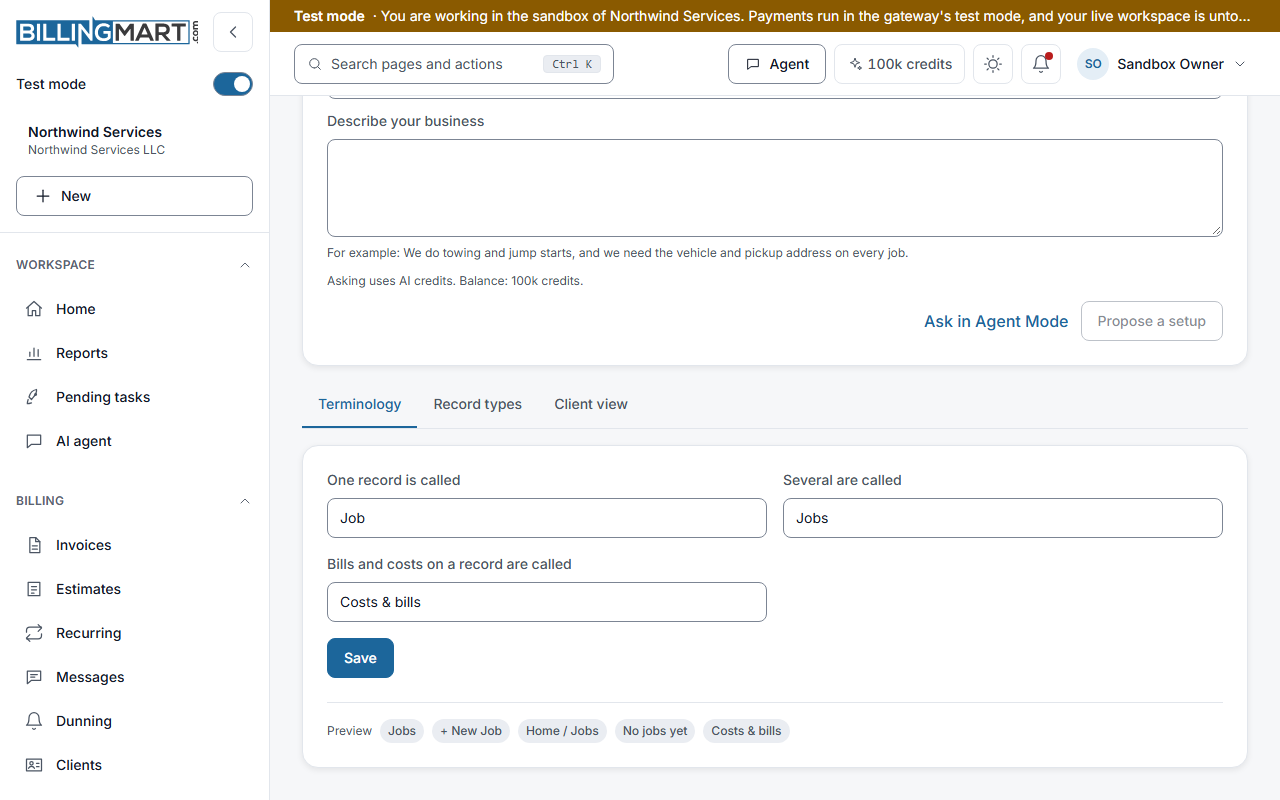
Owners and admins change the words. Staff can open the page and read it. A viewer cannot open it.
- Open Settings, then Work & terminology. The Terminology tab opens.
- Fill in One record is called and Several are called. Both are needed. The plural is never made by adding an s.
- Optionally, change Bills and costs on a record are called.
- Check the Preview strip. It shows the words in the menu, the create button, the page path, an empty list and the bills and costs caption.
- Select Save. You may be asked to confirm it is you.
Each word can be up to 30 characters. If someone else saved first, a banner says so. You can reload their version or save yours over it.
The words each business type sets
Choosing a business type sets these words while nobody in the business has changed its work settings. Once a person saves the words, the pins or the client view, a later business type keeps the words you have.
| Business type | One record | Several | Bills and costs |
|---|---|---|---|
| Towing & Roadside | Call | Calls | Costs & bills |
| Legal | Matter | Matters | Costs & bills |
| Insurance Agency | Policy | Policies | Premium dues |
| Insurance MGA | Policy | Policies | Carrier remittances |
| Insurance Carrier | Policy | Policies | Commissions payable |
| Property Management | Work order | Work orders | Costs & bills |
| Contractor | Job | Jobs | Vendor bills |
The other business types keep Job and Jobs, with Costs & bills.
Good to know
- A label changes no amount. The bills and costs word is a caption under Bills in the menu. It does not rename the Bills module or change any figure.
- The menu entry follows your plural. It reads your plural word. When the menu has a Pinned group, it reads All followed by your plural.
- English only. The words are shown as you typed them.
Related articles
- Jobs: record typesWhat a record type holds, and how owners and admins create, duplicate, publish, order, archive and restore types without breaking older records.
- Jobs: pin record types to the menuPin up to five entries so your most used record types sit in the menu and lead the New menu, and see why a sixth pin is refused.
- Jobs: change your business typeWhat changing a business type adds to your work setup, what it replaces on the invoicing side, what it never removes, and why trying again is safe.
- Set up your business detailsWhere your business name, address, tax ID, invoice numbering, payment terms and business type live, and what you need before your first send.
- Record vendor billsKeep a list of vendors, enter the bills you owe them, open each one to track what is due, and record payments you made elsewhere.